
Automate the handoffs, not the judgement. Automating container rental operations should take repeatable work off your desk without handing important customer or fleet decisions to software.
You already know routine lead follow-up and administrative tasks compete with pricing, fleet planning and customer relationships. When sales, dispatch, fleet and billing information sit in separate workflows, adding software before clarifying the process can create more confusion, not less.
This guide shows you how to identify tasks that are suitable for automation, from lead intake and follow-up to routine dispatch updates. You’ll learn how to set practical measures before making a change, so you can assess whether a workflow is improving response times, accuracy or visibility. It also explains how to introduce changes in manageable steps and keep people involved when a situation calls for context, flexibility or a customer relationship. The aim is steady operational improvement, with routine handoffs handled consistently and exceptions kept in capable hands.
Key Takeaways
- Automating container rental operations works best when you start with repeatable handoffs, not decisions that depend on customer context or operating judgement.
- Map one workflow from start to finish to find delays, unclear ownership and repeated data entry before choosing software.
- Separate routine notifications and record updates from customer, safety and exception decisions that need human review.
- Test automation in stages, train the people involved and track practical measures such as response time, record accuracy or missed handoffs.
- Connect workflow design, technology evaluation and staff training so automation supports daily operations instead of adding another disconnected tool.
Why automate container rental operations, and where does owner time go?
Automate repeatable handoffs, not every decision. Automating container rental operations can help you move routine information between lead intake, sales, dispatch, billing and fleet records without asking an owner to monitor every step. It works best when staff already know what should happen, who owns the next action and what information must be recorded.
Operational automation is the use of software to carry out predictable business tasks or transfer information according to a defined process. That is the core idea behind Business Process Automation. In a container rental business, it might mean a consistent reminder for an unanswered quote or a status update passed from sales to dispatch. It won’t repair a process with unclear responsibilities or unreliable information.
Which recurring tasks consume owner attention?
Trace the work from a customer’s first inquiry through delivery, billing and the container’s next fleet status update. Look for repeated entry, routine checking and points where one person is waiting for another to act. These small interruptions can draw you away from staffing, service issues and fleet planning.
- Lead intake and quote follow-up: Details may be copied between channels or a follow-up may depend on someone remembering to send it.
- Dispatch handoffs: Delivery instructions or order changes may need to be re-entered or relayed before dispatch can act.
- Billing and fleet updates: A completed delivery, return or status change may need to be recorded in more than one place.
Separate frequent, routine tasks from infrequent decisions with greater consequences. A standard reminder can follow a set rule; a customer request that changes delivery plans, a safety concern or an unusual fleet issue needs a person to assess context and choose what to do.
What should automation improve?
Choose one operational benefit to target before selecting a tool. You might want clearer sales-to-dispatch handoffs, fewer manual status checks, more consistent quote follow-up or fewer records that staff must update twice. Treat these as goals to measure, not promised results.
Set a baseline using a measure your team can track, such as the time between an inquiry and the first response, the number of records needing correction, or how often a handoff lacks required information. Then ask whether a more consistent process would make work clearer for staff and communication more reliable for customers.
The best starting point is usually a recurring task with a clear owner, defined inputs and an observable outcome. If the process still depends on unwritten steps or frequent judgement calls, clarify the procedure first. Automation should make a sound workflow easier to repeat, while leaving exceptions and relationship-based decisions with your team.
How to map a container rental workflow before automating it
Map the process before you compare software. Process mapping shows what needs to happen, who is responsible and where information must go, so you can assess technology against an actual operating need rather than a feature list.
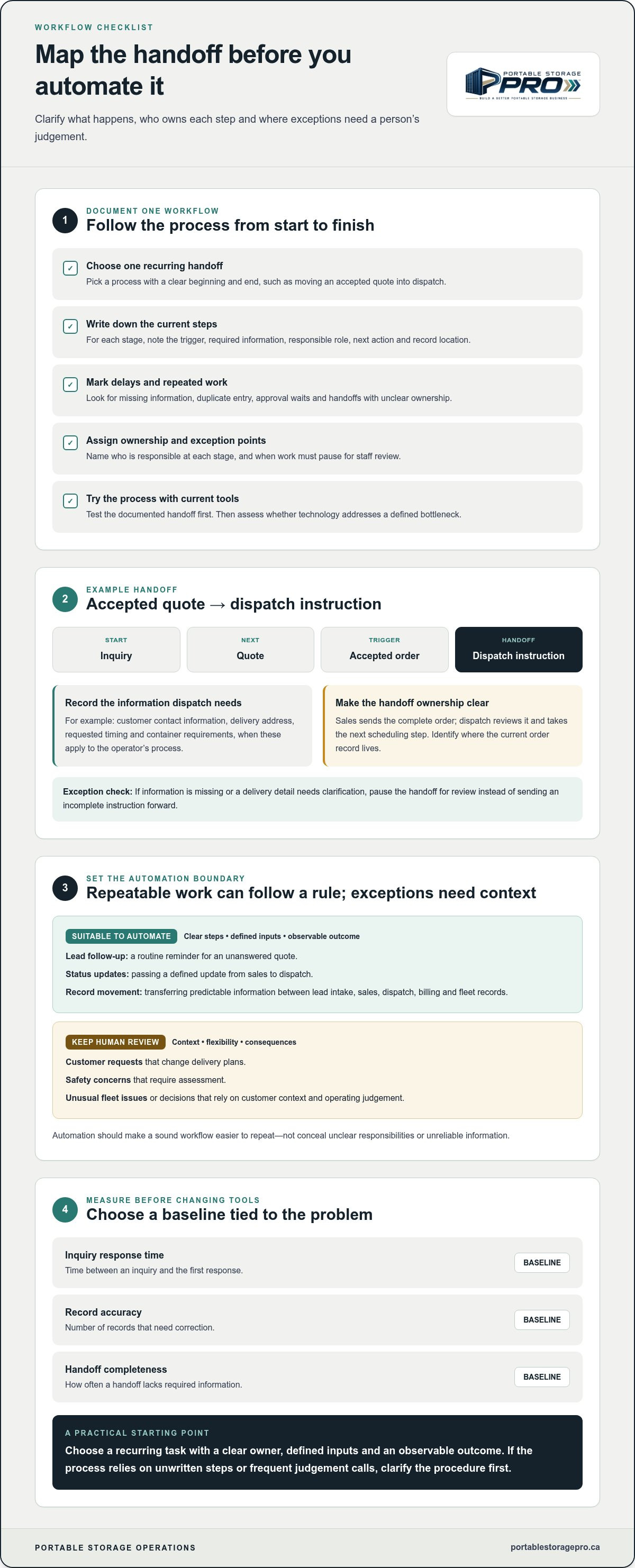
Use this sequence to document one workflow before automating container rental operations:
- Choose one workflow. Start with a recurring handoff that has a clear beginning and end, such as moving an accepted quote into dispatch.
- Document the current steps. Record the trigger, required information, responsible role, next action and where the current record is kept at each stage.
- Find delays and rework. Mark missing information, duplicate entry, approval waits and unclear handoffs.
- Define ownership and exceptions. Assign responsibility for each step and specify when work must pause for staff review.
- Test the documented process. Try the handoff with the existing tools first, then assess whether technology would address a defined bottleneck.
Map the lead-to-delivery handoff
Illustrative hypothetical example: Assume a rental operator receives inquiries by phone and online, prepares quotes using an existing process, then passes accepted orders to dispatch. The map should follow an inquiry to a quote, an accepted order and a dispatch instruction. At each stage, record the trigger, information required, role responsible, next action and record location.
For example, an accepted quote might trigger a dispatch handoff. The required details could include the customer’s contact information, delivery address, requested timing and container requirements, if those are part of the operator’s process. The sales role owns sending the complete order; dispatch owns reviewing it and taking the next scheduling step. Record where the handoff lives, such as the current order record, rather than assuming everyone can find the latest details.
Note what happens when information is missing or a requested delivery detail needs clarification. That is an exception path, not a reason to send an incomplete instruction forward. Reviewing supply chain technology can help you understand the range of tools available, but your mapped handoffs should guide which capabilities matter.
Set a baseline and define exceptions
Before testing a change, select one baseline measure tied to the problem. You could track how long it takes to pass a complete accepted order to dispatch, how often dispatch receives incomplete records, or how often staff must redo a handoff. Use the same measure during the test; set no improvement target until you have a basis for one.
List exceptions that need human review, such as a missing delivery detail, a change after dispatch planning or information that conflicts across records. These are illustrative examples, not assumptions about every operator’s workflow. If you want support connecting workflow design with technology evaluation, Portable Storage Pro’s operational technology guidance can help you plan the next step.
What to Automate and What to Keep Under Human Review
Automate predictable notifications and record updates when a clear trigger, responsible role and next step are defined. Keep customer judgement, safety decisions and exceptions with an accountable person. This distinction helps you match automation to the operating risk, rather than assuming every available feature belongs in your workflow.
Your lead management system is the combination of processes, tools and measures used to handle inquiries. It can support routine acknowledgement and follow-up, but staff still need to review customer needs, unusual requests and any message that calls for a tailored response.
| Task | Automation fit | Human checkpoint | Measure |
|---|---|---|---|
| Inquiry acknowledgement | Send a configured acknowledgement when a new inquiry is recorded; assign it to the lead owner. | Review the inquiry and decide the appropriate response. | Time from inquiry to first response. |
| Quote follow-up reminder | Create a task when a quote is sent, with the next step assigned to the responsible sales role. | Staff assess customer feedback and choose how to follow up. | Follow-up tasks completed by their due date. |
| Accepted quote to dispatch | Update order status and notify dispatch when a quote is marked accepted. | Dispatch checks that required details are complete before acting. | Incomplete handoffs or rework. |
| Routine container status update | Update a fleet record when a defined transaction or staff action changes the status. | Staff investigate conflicting or unexpected information. | Records needing correction. |
| GPS, geofencing or door alert | Flag a location event or alert condition for the responsible role. | Staff assess the alert and context before changing a delivery or service plan. | Alerts reviewed and resolved through the defined process. |
Good candidates for repeatable automation
Start with work that follows the same rule each time: an acknowledgement after inquiry capture, a reminder after a quote is sent, or a status change after a recorded event. Define the trigger, owner and next step so a notification leads to action rather than becoming another unattended message. Customer communications should use reviewed wording and be configured for the right trigger; an automatic message must not imply a commitment your team hasn’t approved.
Decisions that need an accountable person
Keep unusual delivery requests, damaged-container concerns and service recovery under human review. An alert can flag a condition, but it can’t establish the full context or decide the right response. As IBM explains in its overview of supply chain automation, technology can support the flow of work; operating decisions still need clear ownership.
GPS and geofencing provide location information or flag a boundary event. Door and other sensors can report a condition. They don’t automatically resolve the issue. Monitoring is different from active control: a temperature sensor may report a reading, for example, but that doesn’t mean it can change the temperature. Choose tools based on your workflow, fleet and operating needs; no single technology is necessary or suitable for every rental business.
How to implement automation without disrupting daily operations
Introduce automation in stages, with one process, a named owner and a fallback before expanding it. This keeps the test contained and gives your team a clear way to flag failures. A sensible rollout also accounts for setup effort, staff adoption, data quality and ongoing maintenance, not just whether a tool can perform the task.
- Choose one process. Select a defined workflow with a clear trigger and outcome, such as passing an accepted rental order to dispatch.
- Document the current steps. Confirm which role enters, checks and acts on the information, and which record is treated as current.
- Configure a limited test. Set the automation to handle only the selected workflow and specify what should happen when information is missing or a task fails.
- Train the affected users. Explain the revised steps, responsibility boundaries and escalation route before the test begins.
- Review the evidence. Compare results with your baseline, then keep, revise or stop the workflow based on its operational fit.
Run a controlled workflow test
Use a defined test scenario before applying automation to live work more broadly. Check that the right record changes, the correct people receive notifications and the handoff reaches its intended next step. Assign an internal process owner to monitor the test and name who will handle failed tasks, duplicate notifications or incorrect records. Keep the existing manual process available while you assess the results.
Check how the proposed tool fits your existing Technology stack, including CRM, logistics and billing systems. Consider whether information transfers cleanly between them or staff would still need to re-enter it. Data quality matters: an automated task can repeat an incorrect record just as consistently as a correct one.
Train the team and measure the change
Before launch, walk affected staff through the revised steps. Make clear who checks the output, who owns exceptions and where to escalate a failed handoff. Note any extra training or maintenance the workflow requires; a process that depends on constant correction may need redesign before expansion.
Compare your chosen baseline with what you observe during the test. If the measure is incomplete dispatch handoffs, review the records and note whether errors declined, stayed steady or shifted to another step. Don’t assume a change helped simply because the automation ran. Keep it if it supports the process and team, revise it if the test exposes correctable gaps, or stop it if it creates more work or obscures accountability.
If you’re planning automating container rental operations and want to connect workflow design with technology selection, discuss your automation priorities with Portable Storage Pro.
How Portable Storage Pro can help operators plan practical automation
Automating container rental operations is an operating decision before it is a software decision. Portable Storage Pro can help you connect a defined workflow issue to technology evaluation, implementation support and staff training. The aim is to fit the change to your business priorities, not to start with a list of features.
Connect technology choices to operating priorities
Begin with the handoff or administrative task you want to improve and the measure you’ll use to assess it. A change to lead follow-up, for example, may affect sales responsibilities, customer communication and the information dispatch receives when an order is accepted. A fleet status workflow may affect yard routines and how staff confirm container readiness. Consider these connections before selecting a tool.
Portable Storage Pro’s portable-storage-specific advisory and implementation support can help bring workflow design, technology choices and team training together. The work is collaborative and tailored to agreed priorities, with attention to how a change fits existing staff routines and operating procedures.
The Consulting Partner model is distinct from an Operating Partner arrangement. Under the Consulting Partner model, you retain day-to-day management of the business while receiving expertise, resources and support. It should not be treated as automatic full operational management.
Build a practical next step with Portable Storage Pro
Before discussing technology, gather a clear example of the repeated handoff or administrative task that is affecting your operation. Note where it starts, which roles touch it, what information is passed along and what you want to measure. This gives the discussion a practical focus and helps connect technology evaluation with the work your team needs to do.
Portable Storage Pro provides advisory support for independent portable storage and container rental operators, including access to senior-level expertise without building an internal leadership team. Together, you can consider the workflow, the implementation steps and the training needed to put an agreed change into practice. The objective is a sound operating decision, not a guaranteed financial result.
If repeated handoffs or administrative work are competing with your operating priorities, discuss your automation priorities with Portable Storage Pro.
Make your next automation step practical
Effective automation starts with a clear operating process, not a software feature list. Choose a repeatable handoff, document who owns each step, and set a baseline measure before testing a change. Then review whether the workflow improves consistency without taking customer, safety or exception decisions out of human hands.
That’s the practical approach to automating container rental operations: automate routine tasks where the process is clear, train the people who use it, and keep responsibility for exceptions visible. A limited test gives you evidence to keep, adjust or stop a change before applying it more widely.
Portable Storage Pro provides portable-storage-specific advisory and implementation support across agreed priorities, with access to senior expertise without building a full internal leadership team. You remain responsible for day-to-day management in the Consulting Partner model.
Let’s talk about your automation priorities and day-to-day operations. A clear next step can help you put routine work in better order and keep your team focused on the decisions that need them.
Frequently Asked Questions
How can container rental businesses start automating operations?
Start with one repetitive workflow that causes delays, duplicate entry or avoidable follow-up. Document its trigger, required information, owner, next action and exception path, then record a baseline measure. Test a suitable tool with the staff involved and review failed tasks, inaccurate records and missed handoffs. Keep a manual fallback during the test. This measured approach helps you assess whether automating container rental operations fits daily work before expanding it.
Which container rental tasks are best suited to automation?
Routine acknowledgements, reminders, record updates and clearly defined status notifications can be suitable when their triggers and ownership are consistent. Lead intake, quote follow-up and dispatch handoffs may also benefit from structured workflows. First check that staff follow a clear process and that the underlying information is reliable. Keep customer judgement, unusual delivery requests, safety concerns and other operating exceptions under review by an accountable person.
Can automation reduce owner workload in a small rental business?
It can reduce repeated manual steps when the process is clear and the selected tool fits your operation. For example, a routine follow-up reminder may reduce reliance on the owner’s memory, while a shared status update may limit manual checks. Automation still needs a process owner, staff training and exception review. Measure the change in a recurring task before assuming software has freed up meaningful owner time.
Do container rental operators need an all-in-one software platform to automate?
No. The right approach depends on your current systems, workflow needs, data quality and team capacity. A connected platform may suit some operations; others may improve handoffs between existing tools. Map the process first, then assess options against the actual operating requirement, the work needed to adopt them and the ongoing effort to maintain records and workflows. A larger technology change isn’t automatically a better fit.
How should a container rental business measure automation?
Choose a measure tied to the workflow before implementation, then record its starting point. Depending on the task, you could track response time, incomplete lead records, handoff delays, repeated data entry or dispatch corrections. Use consistent definitions when reviewing the test, and consider staff and customer observations alongside system activity. A count of automated messages or updates shows that software ran, not whether the operating process improved.
What should remain manual when automating container rental operations?
Keep decisions that require context, discretion or exception handling under human review. Examples include unusual delivery requirements, customer complaints, damage concerns and changes to a dispatch plan. Technology can surface information, send a prompt or flag a condition, but that doesn’t resolve the issue by itself. Assign a specific person to review exceptions, assess the circumstances and take responsibility for the next action.
How can Portable Storage Pro support technology implementation?
Portable Storage Pro provides advisory and implementation support across agreed business priorities, including technology, operations and training. Support can help connect a defined operating need with technology evaluation and practical process changes. Under the Consulting Partner model, you retain day-to-day management. The Operating Partner is a separate management relationship with defined areas of responsibility. The appropriate scope depends on your priorities, and no specific savings or business result should be assumed.

Article by
Paul Taylor
Paul Taylor is the founder of Portable Storage Pro, bringing more than 35 years of experience across the container, portable storage and transportation industries. His background spans executive operations, business development, global procurement, sales, marketing and operational improvement in Canada, the UK and international markets.
Paul helps independent portable storage and container rental operators increase revenue, strengthen margins and build more efficient businesses. His work connects strategy with practical implementation, including pricing, delivery operations, supplier sourcing, staff training, technology and customer experience.
His experience includes leading multi-location storage operations and serving on the National Portable Storage Association’s board along with chairing its Canadian committee. Through Portable Storage Pro, Paul shares practical insights to help owners make informed decisions, solve operational challenges and grow profitably.
Disclaimer
Content published by Portable Storage Pro Inc. (PSP) provides general business information and industry insights. It does not replace advice tailored to your business or specialist legal, tax, engineering or other regulated advice. Reading this content or contacting PSP does not, by itself, establish a consulting engagement.
Information reflects circumstances at publication and may change. Examples and potential benefits are illustrative; results depend on individual circumstances, implementation and market conditions and are not guaranteed.
Client services are governed by the signed service agreement, agreed work plan and written amendments. Website and blog content do not amend those terms. PSP’s work is subject to applicable law and the professional commitments set out in its agreement, including the CMC-Canada Code of Professional Conduct and NPSA Code of Conduct and Ethics. Copies are available on request.
Views expressed are PSP’s own. Association membership or references do not imply association endorsement or CMC certification. Nothing in this disclaimer limits PSP’s contractual responsibilities, professional duties or rights that cannot lawfully be excluded.


