
What if the problem isn’t that you need more software, but that your existing systems don’t pass reliable information from one step to the next? A container rental technology stack should connect lead handling, bookings, container availability, dispatch, billing and returns so each team can act on the same operating picture.
If leads sit in one tool, dispatch runs from a spreadsheet and container status is updated by hand, it’s harder to know what’s available and what needs attention. Adding another system won’t fix that unless it fits the workflow and shares information where it’s needed.
This guide will help you map the essential functions your stack should support, compare systems by workflow fit, integration and usability, and plan implementation in manageable stages. You’ll also see how to assess whether CRM, rental management, dispatch and tracking tools should work together, and which operating measures can show whether the setup is serving your business. The aim is a connected process from first enquiry to container return, with clearer information and fewer avoidable handoffs.
Key Takeaways
- Map the container rental technology stack around connected workflows, from lead intake and rental records to fleet, dispatch and billing.
- Match CRM and lead management tools to enquiry capture, quote follow-up and customer history, then assess how rental records track container status and availability.
- Compare platforms by workflow coverage, integration, data access, usability and implementation demands, and ask vendors to demonstrate real operator tasks.
- Document current processes and information gaps before choosing systems; set a baseline for quote follow-up, fleet utilisation and delivery rework.
- Turn operational gaps into a prioritised technology brief, with specialist advice supporting your decisions while you retain day-to-day management.
What belongs in a container rental technology stack?
A container rental technology stack connects the tools and records that support your business from a customer’s first enquiry through booking, delivery, active rental, return and the container’s next assignment. It covers lead intake, rental records, fleet status, dispatch and billing. This article is about rented portable storage and shipping containers, not software containers or containerisation.
Technology stack: The integrated set of software tools, such as CRM, logistics and billing systems, used to run a portable storage business. The broader idea of a technology stack describes components working together. For rental operators, the practical test is whether staff can rely on consistent information as responsibility passes from sales to dispatch and operations.
Which rental workflows should the technology stack support?
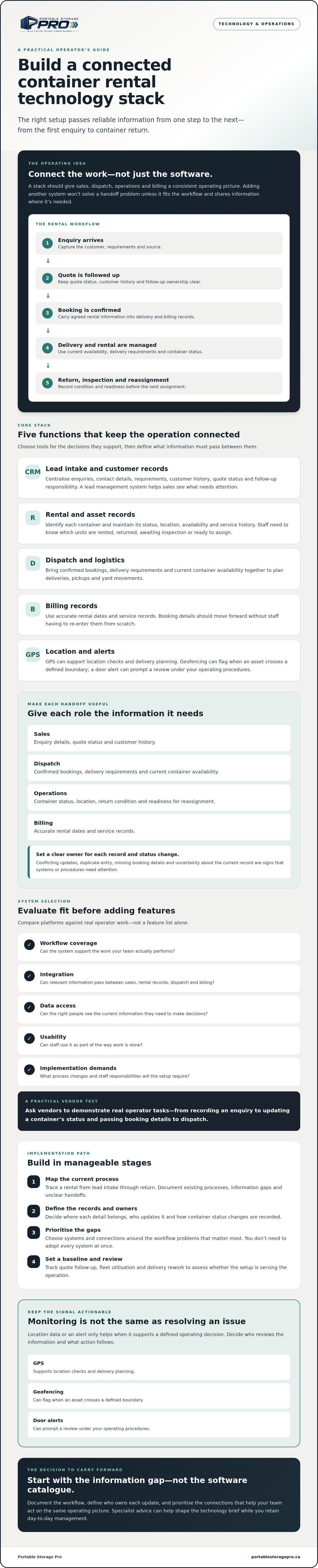
Start with the work, not a particular software brand or a list of features. Trace a typical rental: a lead arrives, sales records the enquiry and follows up on a quote, a booking is confirmed, dispatch plans delivery, and operations tracks the container during the rental. At return, staff record its condition and readiness before it becomes available for another booking.
Each role needs information suited to its decisions. Sales needs enquiry details, quote status and customer history. Dispatch needs confirmed bookings, delivery requirements and current container availability. Operations leads need to see which containers are rented, returned, awaiting inspection or ready to assign. Billing needs accurate rental dates and service records. Task ownership can vary, but each handoff should be clear.
What does a technology stack mean in portable storage?
For portable storage, the stack connects tools for customer records, logistics and billing with information about each rental asset. Records can support visibility into container status, location, availability and service history. Decide where each detail belongs and who updates it when a container’s status changes.
GPS tracking or alerts can add information, but only when they support a defined operating decision. Location data, for example, may help staff check where an asset is; a door alert may prompt a review under your operating procedures. Monitoring doesn’t resolve an issue by itself. Decide who reviews the information and what action follows.
A smaller operator may begin with fewer connected tools than a larger operation. You don’t need to adopt every system at once. Choose a setup that fits your rental workflow, staff responsibilities and information needs, then check whether key records move reliably between the tools you keep.
Which systems form the core container rental technology stack?
Choose systems by the decisions they support, then define what information must pass between them. A CRM helps sales decide which enquiry to follow up; rental records show which container can be booked; dispatch tools guide delivery and pickup planning; billing records support accurate account handling. Together, these functions form the working core of a container rental technology stack. ASCM’s overview of supply chain technology also points to the range of digital tools used to coordinate supply chain activity.
How should CRM, quoting, and billing work together?
Your lead intake process should centralise enquiries from the channels you actively use. A CRM or lead management system can hold contact details, customer history, enquiry requirements, quote status and follow-up responsibility. Once a quote is accepted, the booking should carry the agreed rental information into the records used for delivery and billing, rather than requiring staff to enter it again from scratch.
Set a clear owner for each record and status change. If sales updates a quote in one place while dispatch relies on a separate spreadsheet, staff may act on conflicting information. Duplicate entry, missing booking details and uncertainty about which record is current are practical signs that systems or procedures aren’t connected well enough.
How can GPS and fleet systems support container operations?
Rental or asset records should identify each container and show its status, location, availability and service history. Dispatch can use that information to check whether a suitable unit is available, plan delivery or pickup, and coordinate yard movements. Current location and status records can also help identify empty containers that may need repositioning.
GPS may support location checks and delivery planning. Geofencing can flag when an asset crosses a defined boundary, while door or tamper alerts may prompt a review under your operating procedures. Assess each feature against a specific need: who receives the information, what decision they make and what action follows.
Temperature and humidity sensors monitor conditions; they don’t control them. If you’re considering condition monitoring, confirm how readings are reviewed and what response your operation can provide. Monitoring is useful only when the information supports a defined customer or operating requirement.
Portable Storage Pro provides advisory support to help portable storage operators assess technology needs and system options.
How do you evaluate and connect container rental technology?
Compare systems against the work your team needs to complete, not the length of a feature list. For each option, check whether it supports the workflow, shares information reliably, gives you access to your records, and fits your team’s capacity to implement and maintain it. A useful evaluation also identifies where staff may still need manual workarounds.
| Evaluation area | What to check |
|---|---|
| Workflow coverage | Can staff handle the relevant steps for enquiries, quotes, container records, dispatch, billing and returns? |
| Integration | Which records pass between systems, how do they move, and what happens when an update fails? |
| Data access | Can you export your records, and can you control who can view or change them? |
| Usability | Can the people doing the work find and update the information they need without avoidable duplicate entry? |
| Implementation demands | What process changes, staff training, data preparation and ongoing vendor support will be needed? |
What should a portable storage operator ask a software vendor?
Ask vendors to demonstrate a rental from enquiry to return using your actual workflow. Include routine steps and common exceptions, such as a booking change, a container that isn’t ready for dispatch, or a return that needs follow-up. Check how the system records container status, customer details, quote changes, delivery assignments and return information.
Then confirm what happens to your data. Ask about exports, integration documentation, access controls and support processes. The Maritime Transportation Data Initiative describes work to catalogue, standardise and improve data transmission in maritime transportation. For your selection, focus on the practical question: can the relevant information move between your systems in a form your team can use?
When is one platform preferable to connected tools?
A single platform may suit an operation that values consistent workflows and has limited capacity to manage several applications. Separate tools may fit better when a specific function is important and the systems can exchange the required data reliably. Neither design is right for every operator. Consider your team’s capacity, process consistency, reporting needs and dependence on vendor integrations.
Before deciding, assign an owner to each key record and map where updates must appear. Test the flow with real examples. A system connection may still leave staff copying details manually, while a broad platform may not match every operating step. Include training and workarounds in your evaluation, not just the initial demonstration.
Portable Storage Pro can help operators translate workflow gaps into a focused technology evaluation brief.
How should you implement a container rental technology stack?
Implement the container rental technology stack around one operating priority, not a big-bang software change. First document how work moves today, where information is lost or re-entered, and what decisions staff need to make. Then set a baseline, test one workflow with the people who use it, and review the results before expanding.
What should you document before implementation?
Map the process from lead intake through quote, booking, dispatch, return and container readiness. For each step, record:
- Owner: Who creates, checks or updates the record?
- Information: What details are needed to make the next decision?
- Handoff: Where does the information go, and where is it entered again?
- Exception: What happens when a container is unavailable, a schedule changes or a return needs follow-up?
Set a baseline before changing the process. Track measures that reflect the workflow you plan to improve. For quote follow-up, define which quotes count and what qualifies as a completed follow-up. For fleet utilisation, specify which containers are included and how you distinguish rentable units from those unavailable for service. For delivery rework, record the types of errors or repeat work you want to reduce. Consistent definitions make comparisons useful.
How can you test the system before wider adoption?
Choose one priority workflow, such as moving a confirmed booking into dispatch and then recording its return. Test it with representative scenarios, including a schedule change, an unavailable unit and a completed return. Ask staff in each role to find and update the records they need. Check that status changes appear where the next person expects them, and that key details aren’t lost or entered twice.
Keep a simple issue log during the test. Note integration gaps, manual workarounds, unclear ownership and training needs. Assign each issue an owner and corrective action, then repeat the relevant scenario to confirm the process works. A successful software setup still depends on staff following agreed steps, so update your SOPs and train the team before wider adoption.
Expand only after reviewing both adoption and operating measures. If staff avoid the system or keep parallel records, find out why before adding another workflow. Software can make information easier to manage, but it won’t correct an unclear process on its own.
Portable Storage Pro offers advisory support for technology implementation planning as part of its work with portable storage operators. Learn more about Portable Storage Pro.
How can technology advice help build the right stack?
The right container rental technology stack starts with your operating priorities, not a software catalogue. Technology advice can help you turn workflow gaps into a focused evaluation brief: what needs to improve, which decisions staff need to make, what information must move between systems, and how you’ll assess whether the chosen approach fits.
Portable Storage Pro advises portable storage and shipping container rental operators on technology evaluation and implementation as part of broader business improvement. Its advisory partnership is for operators, not consumer rentals or software sales. Technology choices can affect sales follow-up, dispatch, yard operations, procurement, staff training and the customer experience, so assess them in the context of how your business works.
What can a technology consulting engagement address?
Within agreed business priorities, advisory support can help you assess potential systems, identify workflow and integration requirements, and plan practical steps for implementation. The goal is to connect technology decisions to operating needs, not to select software because its feature list is long. Any proposed tool should have a defined role, a clear process owner and a way to assess its fit.
Under the Consulting Partner model, you receive expertise and support while retaining responsibility for day-to-day operations. The model doesn’t mean that a consultant automatically takes over management. An adviser also shouldn’t promise a particular implementation, saving or business result without evidence. Keep the decision criteria specific to your operation and confirm technical capabilities with the relevant software provider.
What should you prepare for a technology discussion?
A short, practical brief gives the discussion a useful starting point. Bring:
- A workflow map: Show how work moves between enquiry, quote, booking, dispatch, active rental, return and container readiness.
- Your current tools: List the systems and records staff use, including spreadsheets or manual steps that fill gaps.
- Specific operating problems: Note where information is duplicated, handoffs are unclear or staff can’t find a current record.
- Decisions and measures: Define what staff need to decide and which operating measures would indicate whether the process is working better.
Invite sales, dispatch and operations staff to explain how information moves between their roles. Their examples can reveal different needs, such as a quote that doesn’t reach dispatch with complete delivery details or a returned container whose readiness status isn’t updated promptly. Those details help turn a broad request for “better software” into a prioritised evaluation brief.
If you’re ready to discuss technology priorities, integration needs or implementation planning, contact Portable Storage Pro to discuss your operation.
Build a stack that supports the way you operate
A useful container rental technology stack connects information and decisions from lead intake through dispatch, billing and container return. Choose systems by how well they fit your workflows, share essential records and serve the people who use them. Start with a priority process, test it with staff, and review adoption and operating measures before expanding.
Portable Storage Pro provides portable-storage-specific technology and operations advice to help operators assess priorities and plan practical changes. With a Consulting Partner, you receive expertise and support while keeping day-to-day operational responsibility. Under the consulting sourcing model, supplier pricing is not marked up by Portable Storage Pro.
If you’re assessing systems, integrations or an implementation plan, Let’s Talk About Your Business. A clear view of your workflows is a strong starting point, and you can build the right technology approach one practical step at a time.
Frequently Asked Questions
What is a technology stack for a container rental business?
A technology stack is the connected set of software and tools that supports rental work from lead intake through booking, delivery, billing, return and container readiness. It may include CRM, rental or asset records, dispatch and billing functions. The key is how information moves between them. Here, “container” means a rented portable storage or shipping container, not a software container used in application development.
Which software does a portable storage rental business need?
Start with the functions your team needs to run its actual workflow: enquiry and quote tracking, customer and rental records, container status and availability, dispatch planning, and billing. One platform may cover several functions, or connected tools may handle them separately. GPS tracking is an option if location information supports a defined operating decision. Choose by workflow fit and record quality, not by the number of features offered.
Should a container rental business use one platform or several connected tools?
Either approach can work. One platform may suit a team that wants consistent workflows and fewer systems to manage. Separate tools can fit when a specific function needs different capabilities and the systems can exchange required records reliably. Compare staff capacity, reporting needs, process consistency and integration dependencies. Ask vendors to demonstrate your real booking, dispatch and return workflows before deciding.
Can GPS tracking improve container fleet management?
GPS can help you check an asset’s reported location and support availability checks, delivery planning or empty repositioning. Its value depends on whether the information is current, accessible to the right staff and linked to a clear operating action. Decide who monitors location data and what they do with it. Tracking doesn’t replace accurate rental records or confirm that a container is ready for its next assignment.
How do you connect CRM, dispatch, and billing systems?
First define which information must pass between systems, who owns each record and which system is the source for updates. Then confirm with each vendor how data moves, what integration documentation is available, and whether records can be exported. Test the handoff from accepted quote to booking, dispatch and billing. Check for duplicate entry, missing details and failed updates, and document any manual steps staff still need.
How should a small operator choose rental management software?
List your current tools, map the rental workflow and identify the information gaps that affect staff decisions. Prioritise the functions that address those gaps, then compare usability, data access, integration and training demands. Ask vendors to demonstrate routine tasks and exceptions using your process. A smaller operation may need fewer connected systems, but it still needs clear record ownership and reliable handoffs. Test the chosen workflow before expanding its use.

Article by
Paul Taylor
Paul Taylor is the founder of Portable Storage Pro, bringing more than 35 years of experience across the container, portable storage and transportation industries. His background spans executive operations, business development, global procurement, sales, marketing and operational improvement in Canada, the UK and international markets.
Paul helps independent portable storage and container rental operators increase revenue, strengthen margins and build more efficient businesses. His work connects strategy with practical implementation, including pricing, delivery operations, supplier sourcing, staff training, technology and customer experience.
His experience includes leading multi-location storage operations and serving on the National Portable Storage Association’s board along with chairing its Canadian committee. Through Portable Storage Pro, Paul shares practical insights to help owners make informed decisions, solve operational challenges and grow profitably.
Disclaimer
Content published by Portable Storage Pro Inc. (PSP) provides general business information and industry insights. It does not replace advice tailored to your business or specialist legal, tax, engineering or other regulated advice. Reading this content or contacting PSP does not, by itself, establish a consulting engagement.
Information reflects circumstances at publication and may change. Examples and potential benefits are illustrative; results depend on individual circumstances, implementation and market conditions and are not guaranteed.
Client services are governed by the signed service agreement, agreed work plan and written amendments. Website and blog content do not amend those terms. PSP’s work is subject to applicable law and the professional commitments set out in its agreement, including the CMC-Canada Code of Professional Conduct and NPSA Code of Conduct and Ethics. Copies are available on request.
Views expressed are PSP’s own. Association membership or references do not imply association endorsement or CMC certification. Nothing in this disclaimer limits PSP’s contractual responsibilities, professional duties or rights that cannot lawfully be excluded.


