

Portable storage operating procedures explain how your team handles devices containing sensitive information and carries out container operations consistently. They turn expectations into clear responsibilities, decision points and records staff can follow. A useful procedure covers routine tasks and explains what to do when something falls outside the usual process.
You may already have rules for device security, yard activity or customer handoffs. The challenge is making them practical across different roles, locations and stages of an operation. This guide shows how to build procedures that support consistent decisions without relying on informal instructions or individual memory.
You’ll learn how to set safeguards for electronic devices, define repeatable container processes, prepare and load units carefully, and assess weight based on the equipment and transport arrangement. The goal is a practical operating framework your team can understand, use and review as the business evolves.
Key Takeaways
- Allow PHI on portable devices only when its use is essential and approved under your organization’s policy.
- Set clear safeguards for encryption, strong passwords, locked storage, device tracking and backups.
- Document container procedures for inspections, dispatch, delivery, returns and damage reporting so staff follow a consistent process.
- Define safe loading practices around the container’s rated capacity, load distribution and secure placement, rather than relying on guesswork.
- Review procedures with your team regularly so responsibilities, technology and day-to-day operating practices stay aligned.
Safeguards for portable storage devices and laptops containing PHI
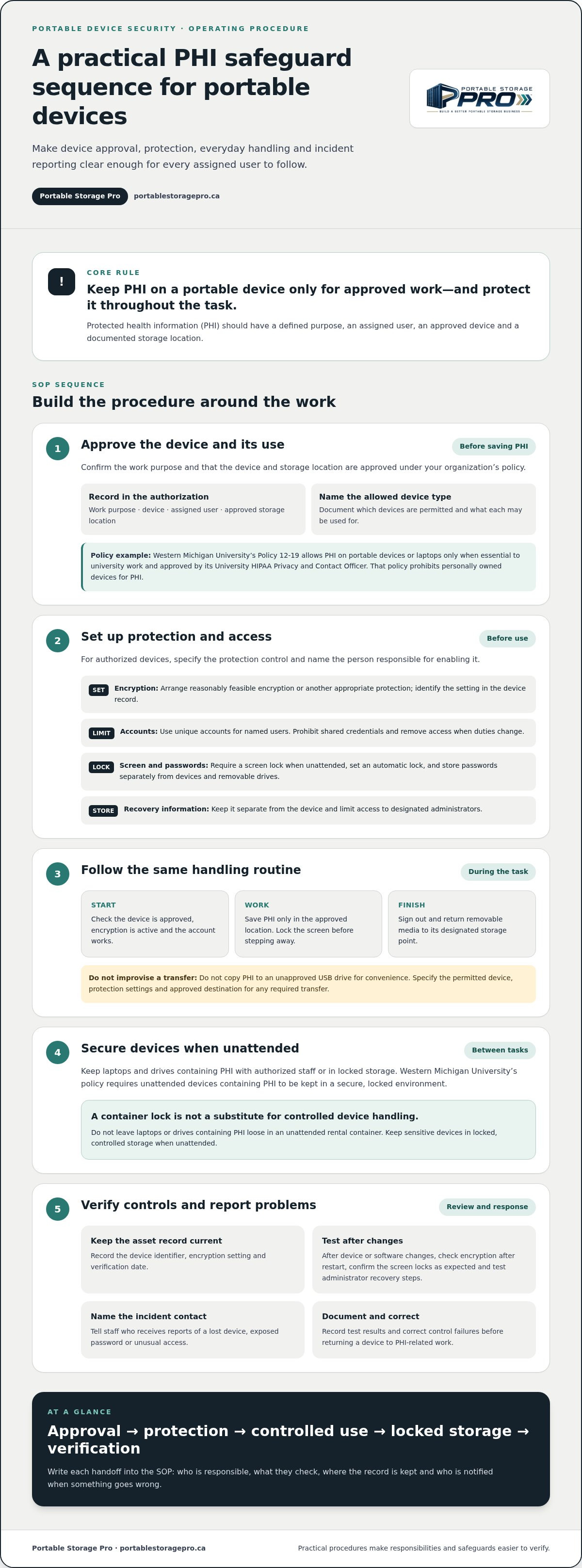
Protected health information (PHI) should be stored on a portable device only for approved work. Western Michigan University’s Portable Storage Device Policy 12-19 permits PHI on portable storage devices or laptops only when storage is essential to university work and approved by its University HIPAA Privacy and Contact Officer. Record the work purpose, device, assigned user and approved storage location so each authorization has a clear scope.
Western Michigan University’s policy prohibits personally owned devices for PHI and applies safeguards to workforce members maintaining PHI on portable devices or laptops. It also requires unattended devices containing PHI to be kept in a secure, locked environment. As a practical rule, keep laptops and drives containing PHI with authorized staff or in locked storage, never loose in an unattended rental container.
Choose storage by task rather than capacity alone. Western Michigan University lists external hard drives from 128 GB to 8 TB for specific use cases, SDXC cards up to 2 TB, and USB flash drives from 32 MB to 64 GB. A removable USB drive may suit an approved transfer, while an external drive may fit a defined working-storage need. Document the permitted device type and approved use.
What items are prohibited in portable storage containers? For a procedure focused on PHI, prohibit placing laptops or drives containing PHI in an unattended container. Define other excluded items in your acceptance policy, and require staff to record and escalate anything outside it.
What permits or placement rules apply in the United States? Determine the placement jurisdiction and site conditions before dispatch, then document any required authorization and placement instructions. Record the approved location, access route and responsible contact in the job file. Don’t assume the process in one locality applies elsewhere.
How should containers be secured against theft and weather? Use an appropriate door lock, inspect the closure and seals, and record visible damage before handoff. Keep devices containing PHI in locked, controlled storage when unattended, as Western Michigan University requires. A container lock does not replace controlled handling of sensitive devices.
How do companies deliver, load, transport and retrieve containers? Record the assigned unit, destination, placement instructions and condition at delivery, then update the unit’s location and condition after retrieval. Include fire, injury and property-damage hazards in staff procedures, such as ignition sources, unstable loads, obstructed access and contact with equipment. An inspection checklist should capture the unit identifier, doors, locks, seals, floor, visible damage, cleanliness and any maintenance action.
Encryption, passwords, and other protections
For PHI authorized on a portable device or laptop, Western Michigan University requires the departmental IT employee to arrange reasonably feasible encryption, strong passwords or other appropriate protection. Name the control for each approved device and the person responsible for enabling it. This makes “secure the laptop” a specific, verifiable setup rather than a vague instruction.
Encryption protects stored information by making it unreadable without the required key or credential. Full-disk encryption covers the laptop’s drive, including files saved outside a designated folder. It can reduce exposure if the device or drive is lost, but it does not stop an authorized user from opening files after signing in. The Protection Profile for Encrypted Storage Device is identified as version 1.0.
Passwords control access, not the contents of a removed drive. Give each user a unique account, prohibit shared credentials and require a screen lock whenever a device is left unattended. Set an automatic lock to cover situations when someone forgets to lock it manually. Store passwords separately from laptops and removable drives. A label attached to the device defeats the control.
Map the procedure to the work sequence. Before saving PHI, the assigned user confirms the device is approved, encryption is active and the account works. During use, the user saves files only in the approved location and locks the screen before stepping away. At the end of the task, the user signs out and returns removable media to its designated storage point.
- Encryption status: Record the device identifier, encryption setting and verification date in the asset record.
- Account access: Assign credentials to named users and remove access when their duties change.
- Recovery process: Keep recovery information separate from the device and limit access to designated administrators.
- Incident response: Specify who receives a report if a device is lost, a password is exposed or access appears unusual.
For example, a staff member carrying an encrypted laptop between work sites should not copy PHI to an unapproved USB drive for convenience. If a task requires file transfer, specify the permitted device, protection settings and approved destination. Staff can then follow a clear process instead of improvising a workaround.
Assign an administrator to test controls after software or device changes. A practical review confirms encryption remains enabled after restart, the screen locks as expected and an authorized administrator can use the recovery steps. Record the results and correct failures before returning the device to PHI-related work. This makes encryption and passwords maintainable, verifiable controls.
What are standard operating procedures for portable storage containers?
Standard operating procedures are written instructions for recurring work, from yard checks to container retrieval. In a portable storage business, they clarify who completes each task, what to record and when to escalate an issue. Describe observable actions rather than broad directions such as “handle carefully.” For example, specify where a yard employee records a damaged door before dispatch.
Build each SOP around a defined process and a clear owner. A dispatch procedure might begin when an order is scheduled and end when the delivery record is complete. Identify the roles involved, equipment required, records to update and conditions that pause the work. If access instructions are missing, explain who must obtain them before the driver departs.
Portable storage operating procedures should cover the container’s full operating cycle. Use a consistent record for each unit so office staff, yard teams and drivers work from the same information.
- Yard intake: Record the unit identifier, arrival condition, location and any repair or cleaning requirement.
- Ready status: Confirm the doors, locking points, floor and exterior meet the operator’s dispatch criteria.
- Dispatch: Match the scheduled order to the correct unit, destination, access notes and delivery instructions.
- Customer handoff: Record placement, visible condition and any issue reported at delivery.
- Return and retrieval: Update the unit’s location and condition, then route damage or maintenance needs to an assigned role.
Good SOPs also explain how to handle exceptions. If a driver finds the placement area obstructed, specify how to pause, document the issue and contact the dispatcher responsible. If a returned unit has a damaged latch, place it on hold until an authorized person assesses it. This prevents incomplete records from making a container appear ready to rent.
Keep procedures usable where the work happens. Use plain language, short task sequences, named forms or software fields, and a revision date. For example, a yard inspection checklist can prompt staff to enter the unit identifier, note defects and attach a photo. A supervisor can review the record and assign follow-up.
Training turns written procedures into consistent work. Ask employees to demonstrate a task, such as recording a delivery exception, and address gaps before they work independently. Review SOPs when equipment, software or workflows change. Track missed fields, repeat damage reports and dispatch delays to identify unclear instructions or training needs.
Review procedures periodically for recurring gaps, such as incomplete condition notes or unresolved exceptions, and assign responsibility and a due point for corrections. Focus on whether staff can follow the procedure in real work, not just whether a form exists. Include applicable device requirements when records or operating details are handled on laptops. Western Michigan University requires laptops containing PHI to have tracking software installed as determined by its Office of Information Technology. Check that the procedure identifies who verifies this requirement, where completion is recorded and what happens if the check is missed. This keeps the SOP useful for both control and consistent task execution.
How do I prepare and pack a portable storage unit safely?
Start with the container, not the load. Before loading, confirm the unit is on stable, level ground and has a clear approach for handling equipment. Inspect the floor, walls, roof, doors and locking points for damage, moisture or debris. Photograph defects and report them before goods go inside. If the container is wet or has a damaged seal, pause loading and follow your condition-reporting procedure.
Plan the load around weight distribution and access. Place heavier, stable items low and spread them across the floor rather than concentrating weight in one area. Keep lighter or fragile items above heavier goods, and use suitable padding between items that could rub or break. Follow the unit’s rated capacity and your loading guidance. Never estimate a safe limit by appearance alone.
- Prepare items: Group goods by size and fragility, then secure drawers, lids and loose components.
- Load evenly: Build stable rows from the floor upward, keeping weight spread across the available space.
- Prevent movement: Use suitable straps, bracing or protective materials to limit shifting during transport.
- Preserve access: Keep the door area clear enough for safe closing, and avoid creating unstable stacks.
- Finish the record: Note the load condition, any visible damage and the completed handoff in the job record.
For example, place filing cabinets upright on a stable base, with heavier cabinets low and secured against movement. Separate fragile equipment from hard edges with protective material. Keep loose items from falling toward the doors when opened. If the load changes during packing, reassess its balance before continuing.
Use an accepted-goods policy before customers begin loading. Give staff a clear reference for restricted or unacceptable items, and explain how to handle questions the policy does not answer. Don’t improvise a safety ruling at the loading site. Record the item, pause that part of the loading process and refer the decision to the designated supervisor.
Before transport, check that the load is stable, the doorway is clear, and the doors close and latch properly. The person completing the handoff should record the container identifier, condition, placement and any loading concerns. These records help distinguish existing damage from issues identified after retrieval.
Turn these steps into a customer checklist and staff procedure. Use plain instructions, a clear escalation contact and a final sign-off field. Review reports of shifted loads, damaged goods and obstructed doors to see where instructions need improvement.
Add location tracking to the handoff record. Portable-storage management software should track each unit’s last recorded delivery location. Keep that entry linked to the unit during preparation so staff can refer to it when identifying the unit being packed. Treat it as a location reference, not a description of the unit’s condition or contents. If the recorded location is unclear or does not match the unit at hand, resolve the discrepancy before completing the handoff. Including this field in the packing workflow gives staff a consistent reference, reduces reliance on informal recollection and keeps the location record current.
What weight limits and loading guidelines do portable storage companies recommend?
There is no single weight limit for every portable storage container. The allowable load depends on the specific unit’s rated capacity and the equipment transporting it. Use the manufacturer’s rating and your written loading guidance, not a figure copied from another container model.
Separate three limits in your procedure: the container’s payload rating, the transport equipment’s capacity and any applicable road restrictions. The lowest limit governs the planned move. Before dispatch, match the unit identifier to its manufacturer documentation and record the approved payload in the fleet or job record. If you cannot verify the rating, hold the unit until staff establish it.
Weight distribution matters as much as total load. A concentrated load can stress one area of the floor, while an uneven load can affect handling during movement. Direct customers or staff to spread heavy items across the floor, balance the load from side to side and secure items against shifting. For example, place dense equipment low and distribute it across the container instead of stacking it at one end.
- Confirm capacity: Check the container’s rating and the transport vehicle’s applicable limit before loading.
- Estimate the load: Use item specifications or shipping records where available. Flag dense machinery, building materials and liquid-filled equipment for review.
- Distribute weight: Spread heavy items over the floor and avoid placing the full load against one wall or end.
- Secure items: Use suitable restraints or bracing to prevent movement during transport.
- Record exceptions: Note unknown weights, unusual cargo or a changed load, then pause dispatch until an authorized person reviews it.
Volume can be misleading. A container may look partly full but still carry a concentrated, heavy load, such as boxed tile or machinery. Lightweight furniture, by contrast, can fill the space without approaching the unit’s rated payload. Assess both estimated weight and distribution rather than using fullness as a proxy.
Build a dispatch check around the actual transport arrangement. Confirm the assigned container, load information, vehicle and route requirements before release. If the customer adds cargo after assessment, update the record and reassess capacity. A changed load requires a new decision, not just a clerical edit.
Use loading records to identify recurring issues, such as unreported dense cargo or uneven placement. Review those cases with staff and revise customer instructions where needed. Consistent checks help your team make a documented decision before a container moves, rather than relying on appearance or assumption.
Portable Storage Pro: Growth Engagement Model
Portable Storage Pro’s Consulting Partner model can help connect operating procedures with the wider needs of your rental business. It can fit when you’re formalizing processes alongside sales, procurement or technology priorities. Relevant areas include Sales, Marketing and Lead Generation; Procurement and Sourcing; and Technology and Innovation.
For example, you may need to align dispatch records with fleet technology, clarify staff responsibilities or prepare procedures for a new operating area. Consulting Partner support can help assess the current process, identify gaps and set priorities that fit your business. Your team retains day-to-day management and leads implementation.
Contact Portable Storage Pro to discuss your operating priorities.
Turn written procedures into a working system
Make ownership clear: assign someone to maintain each procedure, gather staff feedback and identify when a process needs review. Treat portable storage operating procedures as working documents, not files that sit untouched after approval. This keeps operational knowledge connected to your team’s decisions as the business changes.
If procedure development is part of a wider growth plan, Portable Storage Pro’s Growth Engagement Model can connect operational priorities with Sales, Marketing & Lead Generation or Procurement & Sourcing. That support can help you decide which improvement deserves attention first and how it fits your business direction.
Choose one operational priority and discuss how it connects to your growth plans. Contact Portable Storage Pro to discuss your business. A clear next step can help you build procedures your team can maintain and use with confidence.

Article by
Paul Taylor
Paul Taylor is the founder of Portable Storage Pro, bringing more than 35 years of experience across the container, portable storage and transportation industries. His background spans executive operations, business development, global procurement, sales, marketing and operational improvement in Canada, the UK and international markets.
Paul helps independent portable storage and container rental operators increase revenue, strengthen margins and build more efficient businesses. His work connects strategy with practical implementation, including pricing, delivery operations, supplier sourcing, staff training, technology and customer experience.
His experience includes leading multi-location storage operations and serving on the National Portable Storage Association’s board along with chairing its Canadian committee. Through Portable Storage Pro, Paul shares practical insights to help owners make informed decisions, solve operational challenges and grow profitably.
Disclaimer
Content published by Portable Storage Pro Inc. (PSP) provides general business information and industry insights. It does not replace advice tailored to your business or specialist legal, tax, engineering or other regulated advice. Reading this content or contacting PSP does not, by itself, establish a consulting engagement.
Information reflects circumstances at publication and may change. Examples and potential benefits are illustrative; results depend on individual circumstances, implementation and market conditions and are not guaranteed.
Client services are governed by the signed service agreement, agreed work plan and written amendments. Website and blog content do not amend those terms. PSP’s work is subject to applicable law and the professional commitments set out in its agreement, including the CMC-Canada Code of Professional Conduct and NPSA Code of Conduct and Ethics. Copies are available on request.
Views expressed are PSP’s own. Association membership or references do not imply association endorsement or CMC certification. Nothing in this disclaimer limits PSP’s contractual responsibilities, professional duties or rights that cannot lawfully be excluded.


