
What if a location alert tells you where a container is, but not what your team should do next? Storage container tracking and monitoring can help you locate assets across yards, customer sites and transit, but the right setup depends on the decisions you need to make.
Tracking and monitoring are easy to treat as interchangeable. Tracking focuses on location. Monitoring flags conditions, such as a door opening or a change in temperature, that may need attention. Either can create extra work if alerts have no clear owner or response steps.
This guide shows you how to match tracking and monitoring capabilities to your fleet’s operating needs, from finding idle containers to responding to exceptions. You’ll learn how to assign ownership, define follow-up steps and keep location records useful for fleet planning, yard coordination and customer service. The aim is not to collect more data. It’s to make better decisions with information your team can act on.
Key Takeaways
- Match storage container tracking and monitoring capabilities to the fleet decisions you need to make, from locating assets to responding to condition alerts.
- Separate location and movement data from condition data, then consider what each can tell you and where its limits lie.
- Compare options by asset stage, coverage, update behaviour, data access and the staff workload required to act on alerts.
- Begin implementation by defining decisions and mapping assets. Pilot a contained workflow before training staff and reviewing results.
- Turn raw data into useful measures, such as location exceptions and idle assets, and assign an owner to review each one.
Why Storage Container Tracking and Monitoring Matter in Rental Operations
A rental container passes through several locations and hands between yard readiness and return. If your records don’t show its current stage, dispatch may plan around an unavailable asset, yard staff may have to search for equipment, and customer-service staff may not have a reliable update. Storage container tracking and monitoring connects asset visibility to these day-to-day decisions.
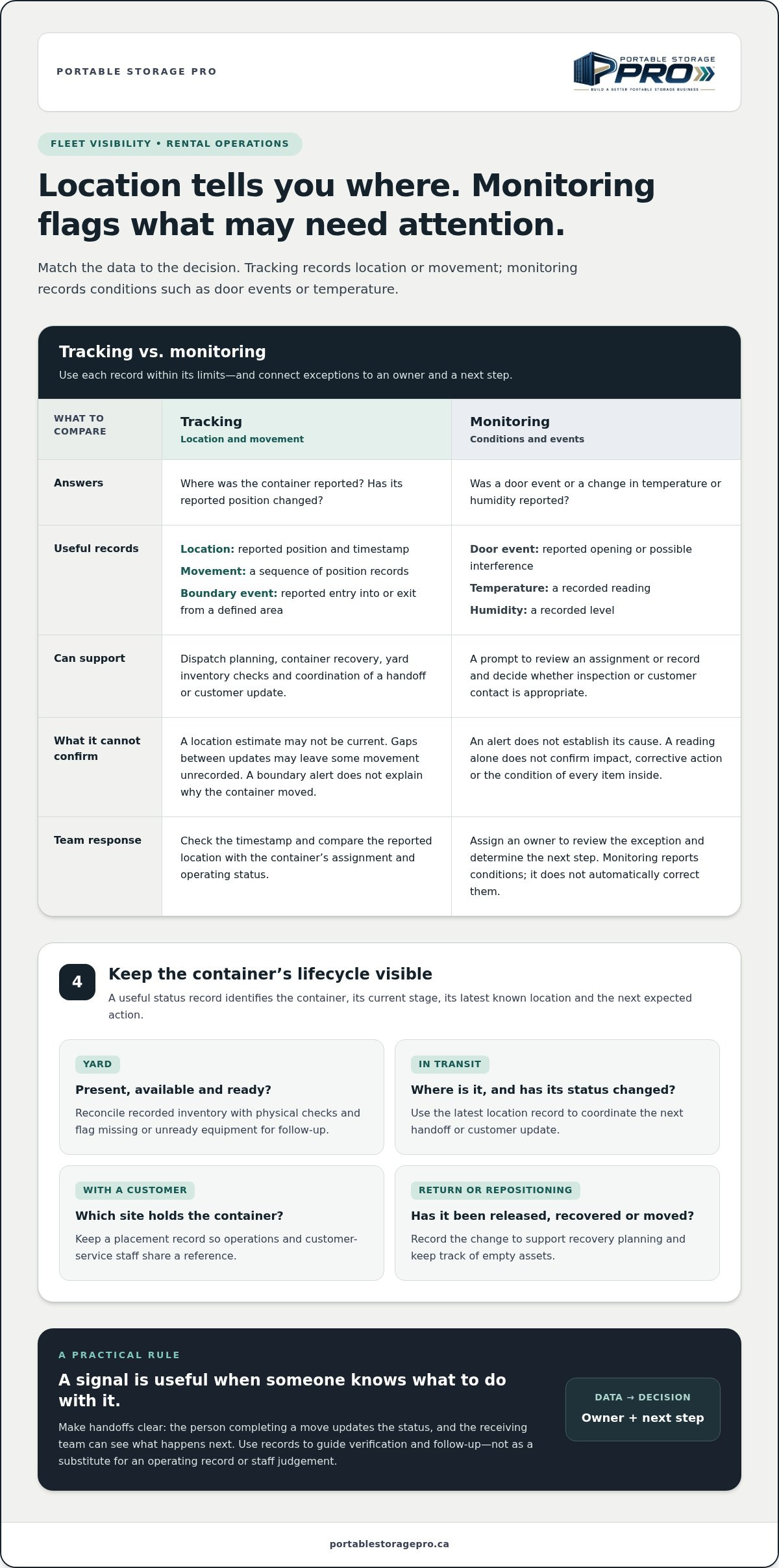
Container tracking records a container’s location or movement. Condition monitoring records information about the container or its contents, such as a door event or temperature reading. Location data helps answer “Where is it?” Condition data helps answer “What may need attention?” Neither replaces a clear operating status or a person responsible for acting on an exception.
This is the rental-fleet application of supply chain visibility: useful information needs to follow an asset through the workflow, not sit apart from operational records.
Which stages of a portable-storage container’s lifecycle need visibility?
Map visibility to the questions staff need answered at each stage. A status record should identify the container, its current stage, its latest known location and the next expected action.
- In the yard: Is the container present, available and ready for dispatch? A current yard record helps staff reconcile inventory and prepare the right equipment.
- In transit: Where is the container, and has its status changed? Dispatch can use the latest location record to coordinate the next handoff or customer update.
- Placed with a customer: Which site holds the container, and is it still assigned there? A placement record gives operations and customer-service staff a shared reference.
- Awaiting return or repositioning: Has the container been released, recovered or moved to another location? Recording the change helps staff plan recovery and track empty assets.
Handoffs are clearer when the person completing a move updates the status and the receiving team can see what happens next. Without a shared record, staff may rely on separate messages or assumptions, making it harder to coordinate dispatch, confirm a placement or answer a customer’s question.
What decisions can tracking and monitoring support?
Location records can inform dispatch planning and container recovery. Yard visibility supports inventory checks and readiness reviews, while placement and return records help identify which assets are occupied, available or awaiting action. The value comes from connecting each record to a decision, not simply collecting location points.
- Dispatch: Check which suitable containers are available and where they are before assigning work.
- Yard readiness: Compare recorded inventory with physical checks, then flag missing or unready equipment for follow-up.
- Condition follow-up: Treat a door or environmental alert as a prompt for someone to review the record and decide whether inspection or customer contact is appropriate.
Monitoring reports conditions. It doesn’t automatically correct them. Assign an owner and next step to each exception so information supports action instead of creating an unmanaged alert queue.
Tracking vs. Monitoring: What Container Data Actually Tells You
Each record is useful only within its limits. A location point can help staff check an assignment, but it may be out of date by the time they view it. An alert can flag an event, but it doesn’t explain the cause. Use the data to guide verification and follow-up, not as a substitute for an operating record or staff judgement.
The following data types can help answer different questions. Consider their limitations when reviewing records.
- Location: Where was the container reported? Check the timestamp to judge whether the record is relevant to the current task. A location estimate may not represent the container’s present position.
- Movement: Has the reported position changed? A sequence of records can help review a transfer, but gaps between updates may leave part of the movement unrecorded.
- Boundary events: Was entry into or exit from a defined area reported? A geofence notification can flag a boundary crossing. It won’t establish why the event occurred or confirm the asset’s intended status.
- Tampering or door events: Was a door event or possible interference reported? Treat the notice as a reason to review the assignment and event details, not as proof of theft or prevention.
- Temperature: What temperature did the sensor record? Compare it with the operating requirement relevant to the service. A reading alone doesn’t establish cause, impact or corrective action.
- Humidity: What humidity level was recorded? The value may prompt further review, but it doesn’t confirm the condition of every item inside the container.
Location tracking, GPS, cellular, and geofencing
Where a system supports GPS, it can estimate an asset’s location. A geofence is a defined area that can produce a notification when a reported position crosses its boundary. For example, a yard departure notice may prompt dispatch to check whether the container was assigned to a job. The notice doesn’t confirm the job or explain why the asset moved.
Update timing and connectivity affect how staff should interpret location records. Keep the timestamp visible, and set a rule for when a report is too old to support a dispatch decision. If a record is delayed or unavailable, staff should verify the status through the operating process rather than treating the last point as current.
Door, temperature, and humidity monitoring
A door or tamper alert indicates an event. Staff can review its timing and the container’s assigned status, then decide whether inspection or customer contact is appropriate. The alert doesn’t prevent access. Temperature and humidity readings also need context: the relevant operating threshold, the asset’s assignment and a person responsible for review.
Sensors don’t regulate conditions inside the container. Define who assesses an alert, how they record the decision and when an issue needs escalation. This prevents a reading from being mistaken for an automatic response or a confirmed assessment of the contents.
How to Compare Storage Container Tracking and Monitoring Options
Compare options against the operating decisions your team needs to make, not the length of a feature list. A useful system should answer a defined question at a specific fleet stage, provide information staff can access and point to a clear follow-up. Data nobody reviews adds little value.
Start with a decision table. Adapt the recipients and actions to your roles, and distinguish essential operating questions from optional readings no one is assigned to use.
Asset stage: In the yard. Required data: Recorded location and asset status. Alert recipient: Yard lead. Follow-up: Reconcile the record with a physical inventory check and update readiness.
Asset stage: In transit. Required data: Location with a timestamp, plus movement events if needed. Alert recipient: Dispatch. Follow-up: Review the latest record before changing a job plan or giving a customer an update.
Asset stage: Placed with a customer. Required data: Assigned site and any agreed event or condition readings. Alert recipient: The designated operations or customer-service contact. Follow-up: Check the record and decide whether inspection or contact is appropriate.
Asset stage: Awaiting return. Required data: Current status and last reported location. Alert recipient: Dispatch or fleet coordinator. Follow-up: Confirm the return plan and record the next handoff.
Next, compare the operating limits behind each option. Check coverage in the areas where containers sit or travel, how often records update and how the system displays a lost connection. A stale location can be mistaken for a current one unless its timestamp is visible. False alerts can divert attention, while manual data entry can leave tracking and fleet records out of step.
Match tracking capability to the operating question
For locating an asset, compare the location source, update frequency and coverage. For detecting movement, review how event rules and geofence boundaries are set, and who receives notifications. For condition visibility, identify which sensor readings staff can review and where they record their response. Include device upkeep in the comparison because an unmaintained device may leave gaps in the records.
Check whether the data fits the technology stack
Decide whether staff can access records within existing software or need a separate interface. Map useful links to CRM, logistics, billing or inventory records, then identify any manual transfers that remain. Consider how this information fits your wider technology stack: an integration is useful only if it keeps asset records clear and reduces duplicate work.
A practical evaluation accounts for workflow, data access and staff training alongside technical capabilities. Portable Storage Pro’s technology consulting can help you assess those choices against your operating needs.
How to Implement Container Tracking and Monitoring in a Working Fleet
Storage container tracking and monitoring works best when the data fits a defined operating process. Before expanding across your fleet, establish what staff need to know, who responds to exceptions and how they’ll record the outcome. Start with a contained fleet group or workflow, then use what you learn to refine the process.
- Define the decisions. Write down the operating questions the system should answer, such as whether an assigned container has moved or a condition reading needs review.
- Map the assets. List the containers in scope, their current statuses and the records staff use to manage them. Note where information is missing or inconsistent.
- Select the data. Choose only the location, movement or condition information that supports those decisions. Set expectations for how staff will interpret gaps and outdated records.
- Pilot the workflow. Apply the process to a contained group of assets or a specific workflow. Record exceptions, data-quality issues and the staff time needed for follow-up.
- Train the people involved. Show staff how to find an asset, interpret its status and document the action taken. Make ownership clear across dispatch, the yard and customer service.
- Review before expanding. Check record accuracy and follow-up completion. Adjust the process where the evidence shows a problem, then decide whether it’s ready to extend.
Keep the pilot focused on whether information is accurate and usable, not on how much data it collects. A location record that cannot be matched to the correct container or operating status can create confusion instead of clarity.
Set up asset records and exception rules
Give every monitored container a consistent identifier in the tracking record and the operating system staff already use. Define which events need follow-up, who receives each notice and what response is expected. For example, assign an unexpected movement notice to a named dispatch role, with a step to check the asset record and document the decision.
Keep each exception open until someone records its resolution. Include the event, assigned owner, action taken and status. This helps staff distinguish an unresolved issue from an old alert that remains visible but no longer needs attention.
Train staff and review the process
Dispatch and yard staff need to know how to search by container identifier, read the status and recognize when location data may be out of date. Practise responses to a missed signal, unexpected movement and condition alert. Each scenario should identify who checks the record, who decides the next step and where the outcome is entered.
Review recurring exceptions and follow-up completion with the people responsible for the workflow. Change alert rules only when the operating need supports it, and record why the change was made.
Before extending the process, review measures such as identifier match rate, records with a current status, unresolved exceptions and completed follow-ups. Assign an owner to each measure and agree how often it will be reviewed. These measures give you a practical basis for deciding whether the process is ready to expand.
Turn Tracking Data into Better Fleet Decisions with Portable Storage Pro
Tracking information supports better fleet decisions when it is reviewed alongside operating records and assigned follow-up. For a rental operator, the useful question isn’t simply how many location updates a system collected. It’s whether the records helped staff resolve exceptions, identify assets awaiting action and make consistent decisions across dispatch, the yard and customer service.
Review a small set of operational measures rather than relying on raw data alone:
- Unresolved location exceptions: The number of location discrepancies still awaiting action. The fleet or dispatch lead reviews each one and confirms an owner and next step.
- Status match rate: The share of reviewed containers whose tracking record agrees with dispatch, yard or customer records. The yard lead or fleet coordinator investigates mismatches.
- Idle asset follow-up: The number of containers identified as idle that have a documented next action, such as checking assignment or return status. The fleet coordinator reviews these records.
- Condition follow-up completion: The share of condition alerts reviewed and recorded as resolved or requiring further action. The assigned operations lead reviews open items.
Build a repeatable review of fleet visibility
Set a review point that fits your operating rhythm. Start with unresolved location exceptions, confirm each has a named owner and next action, then compare recorded status with dispatch, yard and customer records. For idle assets, distinguish a verified status from a location record that has not been updated. For condition alerts, confirm whether the team reviewed the reading and documented its decision.
Look for patterns, not just individual alerts. Repeated mismatches may point to inconsistent status updates or unclear handoffs. Gaps in condition-alert follow-up may show that staff need clearer instructions. Use those findings to refine procedures, training or technology requirements. The Portable Storage Asset Tracking Solutions guide is a related topic for operators assessing asset visibility across their fleet.
Apply an operator-led technology evaluation
Treat each proposed feature as a response to an identified operating decision. Ask what staff need to know, where they’ll access the record, who will act on it and how the outcome will be documented. Assess adoption, data quality, integration and staff responsibilities together. A tool that collects useful information but leaves workers with duplicate entry or unclear ownership may not fit the workflow.
Portable Storage Pro supports technology evaluation, training, sourcing and implementation planning for portable-storage operators. This work can help you connect tracking requirements to fleet processes and the systems your team already uses. Device selection alone does not establish a complete operating process. For broader system-fit considerations, the Evaluating Logistics Software for Portable Storage guide addresses how software choices relate to operational workflows.
Make Fleet Visibility Part of Your Operating Rhythm
Choose a practical next step: identify one recurring fleet decision that’s difficult to make with your current records, then define what information would help and who should act on it. Storage container tracking and monitoring becomes more useful when it supports a process your team can maintain, rather than adding another stream of data to manage.
Portable Storage Pro helps operators assess technology against their workflows, with support for evaluation, training, sourcing and implementation. Paul Taylor brings more than 35 years of experience across containers, transportation, procurement and operations. Discuss your container tracking and monitoring priorities with Portable Storage Pro.
Frequently Asked Questions
Can GPS tracking prevent a storage container from being stolen?
No. GPS tracking can’t physically prevent theft or guarantee that a container will be recovered. Depending on the device, coverage and system, it may help your team review a reported location or movement event. If an alert appears, check the container’s identifier and assignment against current records before treating it as an incident. Record who verified the event and which security procedure they followed so the next person has a clear account.
How often should a portable storage container send a location update?
There isn’t one update interval that suits every fleet task. Set it according to the decision at hand. For a dispatch handoff, compare the latest location timestamp with the job’s planned milestones. For a yard review, a less frequent record may be sufficient. Define what your team considers too old for each use, then assess whether the available update pattern meets that requirement.
Can one tracking system monitor containers across yards and customer sites?
Potentially, if the system supports the locations, asset records and workflows you need. Before relying on one view, test whether staff can find the same container by its standard identifier at each stage. Check how the system represents a container moving from a yard to a customer site, and how it flags delayed or unavailable records. Consistent status labels help prevent duplicate or conflicting records.
What should an operator do when a container tracker stops reporting?
Treat the last successful report as the last known record, not a current location. Compare it with recent dispatch instructions, yard records or customer communications, then assign someone to verify the container’s status through the normal operating process. Note when reporting stopped and what was checked. If gaps recur, review whether they coincide with particular locations, device upkeep tasks or missed status updates before changing procedures.
Does a temperature or humidity sensor control conditions inside a container?
No. A temperature or humidity sensor reports a measurement; it doesn’t change the container’s environment by itself. Before using readings operationally, decide what range requires review for the service you provide and who assesses an exception. A reading outside your defined range can prompt a documented review, but it shouldn’t be presented as proof of damage or as a climate-control function.
How can container tracking records support fleet planning?
Use tracking records to examine how long containers remain in each recorded status and where status changes are not documented. First define what your business means by “idle,” such as an asset with no active assignment recorded. Then compare that report with rental and dispatch records before making repositioning or availability decisions. A consistent definition makes fleet reviews more useful than a list of map locations alone.
Can tracking data connect to a portable-storage CRM or logistics system?
It depends on the systems and the data each can share. Before connecting them, map the fields staff need, such as the container identifier, assigned site, status and last update. Decide which record is authoritative if two systems disagree, and who corrects a mismatch. Test a complete handoff from tracking record to the relevant CRM or logistics workflow, including how staff see and resolve an exception.

Article by
Paul Taylor
Paul Taylor is the founder of Portable Storage Pro, bringing more than 35 years of experience across the container, portable storage and transportation industries. His background spans executive operations, business development, global procurement, sales, marketing and operational improvement in Canada, the UK and international markets.
Paul helps independent portable storage and container rental operators increase revenue, strengthen margins and build more efficient businesses. His work connects strategy with practical implementation, including pricing, delivery operations, supplier sourcing, staff training, technology and customer experience.
His experience includes leading multi-location storage operations and serving on the National Portable Storage Association’s board along with chairing its Canadian committee. Through Portable Storage Pro, Paul shares practical insights to help owners make informed decisions, solve operational challenges and grow profitably.
Disclaimer
Content published by Portable Storage Pro Inc. (PSP) provides general business information and industry insights. It does not replace advice tailored to your business or specialist legal, tax, engineering or other regulated advice. Reading this content or contacting PSP does not, by itself, establish a consulting engagement.
Information reflects circumstances at publication and may change. Examples and potential benefits are illustrative; results depend on individual circumstances, implementation and market conditions and are not guaranteed.
Client services are governed by the signed service agreement, agreed work plan and written amendments. Website and blog content do not amend those terms. PSP’s work is subject to applicable law and the professional commitments set out in its agreement, including the CMC-Canada Code of Professional Conduct and NPSA Code of Conduct and Ethics. Copies are available on request.
Views expressed are PSP’s own. Association membership or references do not imply association endorsement or CMC certification. Nothing in this disclaimer limits PSP’s contractual responsibilities, professional duties or rights that cannot lawfully be excluded.


