
A new platform won’t fix a workflow nobody owns. Effective storage business technology implementation starts with the operating problem: information gets lost between sales and dispatch, delivery updates don’t reach customer service, or billing relies on duplicate data entry. The right tool should support a clear decision and fit how your portable-storage business works.
Choosing software can be difficult when each option promises to solve a different part of the operation. A poorly planned rollout can also disrupt quotes, deliveries, billing, or customer service. Assess more than features: your team’s capacity, existing processes, and handoffs between roles all matter.
This guide shows you how to turn technology choices into a practical implementation plan. Define operational requirements, connect tools to portable-storage workflows, assign responsibilities, and introduce changes in stages. You’ll also learn how to track adoption and operating performance without assuming a new system will produce results on its own.
From CRM and online quoting to fleet tracking and billing, each part of your technology stack should have a defined purpose. Portable Storage Pro advises operators on technology and innovation with current workflows, team capacity, and priorities in view. The goal is a considered rollout, not added complexity.
Key Takeaways
- Start storage business technology implementation with a specific operating problem and decision, not a list of software features.
- Match each tool to the workflow, people, information, and decisions it needs to support.
- Compare technology options for workflow fit, integration needs, data ownership, training, and support. Confirm compatibility in your own operation.
- Introduce changes in stages: define the need, map the process, select a tool, pilot it, train affected roles, and review results.
- Portable Storage Pro provides technology and innovation advice alongside wider business priorities. Advisory support does not transfer day-to-day management.
What storage business technology implementation should solve first
Start with the operating decision your team needs to make, not a list of software features. A CRM, dispatch platform, or billing system only helps if it supports a defined task, fits the handoffs between roles, and gives someone responsibility for keeping the process on track.
Storage business technology implementation means introducing a tool, a working process, and an accountable owner to address a specific operating need, then checking whether the process supports the intended decision. Buying software alone doesn’t establish who enters information, who acts on it, or how the team will judge whether the change is working.
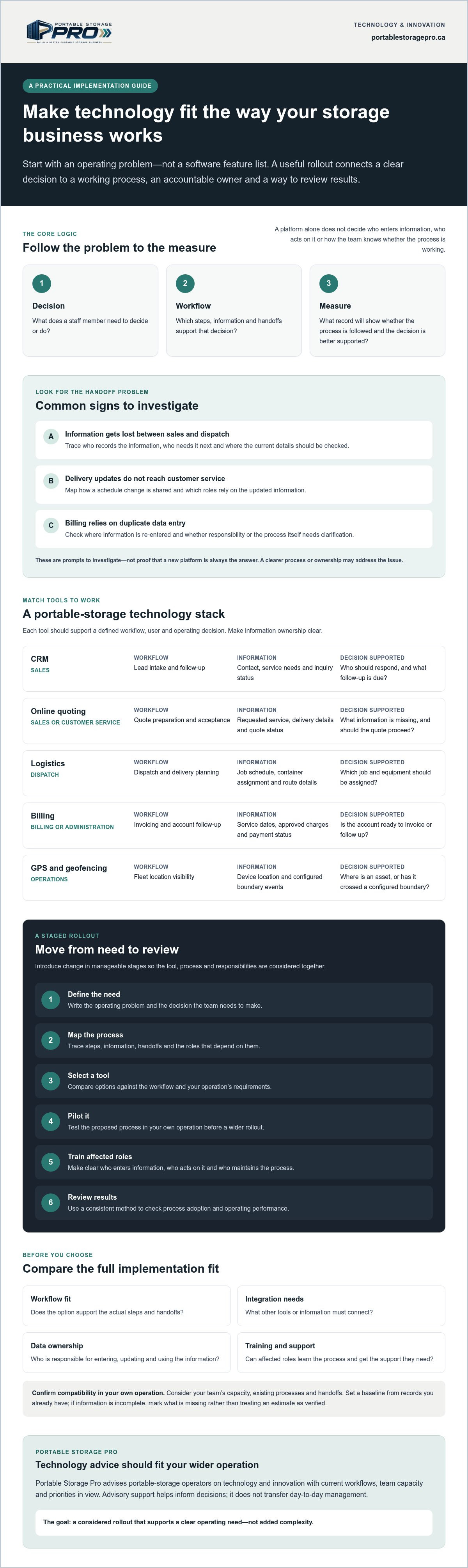
Use a simple decision-to-workflow-to-measure sequence:
- Decision: What does a staff member need to decide or do?
- Workflow: What steps and handoffs provide the information needed?
- Measure: What record will show whether the process is being followed and the decision is better supported?
This is a practical way to assess Business Process Automation (BPA): first understand the process, then determine whether technology should support or automate part of it.
Which portable-storage workflows reveal a technology need?
Trace information from lead intake through quote follow-up, dispatch, delivery, billing, and customer updates. At each handoff, note repeated data entry, delays, missing details, and unclear ownership. These are signs to investigate, not proof that a new platform is always the answer. A revised process or clearer responsibility may address the issue.
For example, sales might record a delivery date in a quote file, then dispatch re-enters it into a schedule. If the date changes, customer service may not receive the update. Map who records the change, who needs to know, and where the current date should be checked. That may point to a process or system gap. The example won’t fit every operator, so trace your own workflow before choosing a tool.
What should an operator clarify before choosing a tool?
Write a short problem statement: “We need dispatch to confirm the current delivery schedule before assigning a job.” Then identify who uses that process, what information they need, and when it must be available. Include adjacent roles, such as sales or customer service, if they depend on the same update.
Set a baseline using records you already have. Depending on the problem, these could include quote follow-up records, schedule changes, or billing corrections. Decide how and when you’ll review the information, and use a consistent method. If records are incomplete, mark what’s missing rather than treating an estimate as a verified result. That gap is useful: it shows what information the implementation plan needs to capture.
How to match tech stacks to portable-storage operations
Your technology stack should reflect how containers move through your business, from the first inquiry to delivery, billing, and return. Match each tool to a workflow and a decision before assessing software features. A modern storage business tech stack is a set of tools your team can use consistently, with clear responsibility for the information they hold.
| Tool category | Workflow | Primary user | Typical information | Decision supported |
|---|---|---|---|---|
| CRM | Lead intake and follow-up | Sales | Contact, service needs, inquiry status | Who should respond, and what follow-up is due? |
| Online quoting | Quote preparation and acceptance | Sales or customer service | Requested service, delivery details, quote status | What information is missing, and should the quote proceed? |
| Logistics | Dispatch and delivery planning | Dispatch | Job schedule, container assignment, route details | Which job and equipment should be assigned? |
| Billing | Invoicing and account follow-up | Billing or administration | Service dates, approved charges, payment status | Is the account ready to invoice or follow up? |
| GPS and geofencing | Fleet location visibility | Operations | Device location and configured boundary events | Where is an asset, or has it crossed a defined boundary? |
How should CRM and online quoting support lead handling?
Trace an inquiry from first contact through quote, follow-up, and recorded outcome. Staff need enough context to prioritise a response, such as the requested service, delivery details, and current status. A lead management system includes the process, tools, and measures for handling inquiries, not just a CRM screen. Decide who updates each record and how you’ll review follow-up and quote outcomes.
When do logistics and asset-tracking tools fit?
Logistics tools can help dispatch coordinate jobs, routes, and equipment assignments. That information may also support decisions about repositioning empty containers. GPS provides location visibility, while geofencing can generate alerts when an asset crosses a configured boundary. Confirm device and system compatibility in your operation before relying on those functions. If you’re exploring portable storage asset tracking solutions, define the decisions location data needs to support and who will act on it.
An alert reports a condition or event. It doesn’t, by itself, control equipment or change temperature or humidity. Define the staff response before enabling alerts. For broader supply-chain context, see Supply Chain Insights from Harvard Business Review.
How to compare technology options without overlooking implementation trade-offs
A feature may sound useful in a vendor demonstration and still fail to fit your operation. Compare each option against the work it must support, the records it needs, and the people responsible for using it. Feature counts alone don’t establish operational fit. A tool fits when your team can use it to make a defined decision with reliable information.
For storage business technology implementation, weigh workflow fit alongside integration needs, data ownership, training, and support. A system may cover more functions but require extra data entry or a process your team can’t maintain. If staff records are inconsistent, the software may organise incomplete information rather than resolve the underlying problem. Low adoption can leave you with both the new system and old workarounds.
What should a technology evaluation matrix include?
Classify each requirement as must-have, useful, or outside the current implementation scope. Then record who will use it, which operating decision it supports, what information it needs, and how you’ll test whether it meets the requirement. This keeps vendor answers comparable and helps prevent optional features from obscuring a basic workflow gap.
- Requirement: Dispatch needs to see the current delivery status.
- Priority: Must-have if dispatch can’t reliably access that information today.
- Evaluation: Ask each vendor to demonstrate the same task using representative delivery information.
- Confirmation: Mark whether the answer is demonstrated, documented, or still awaiting verification.
Apply the same method to training and support. Ask who provides user guidance, how staff can get help, and what your team must maintain after setup. Record unresolved questions rather than treating a sales statement as a confirmed capability.
How can operators assess data and integration risks?
List where customer, container, delivery, and billing records currently reside. They may be split across software, spreadsheets, email, or paper records. For each handoff, ask what information moves, who enters it, who checks it, and who corrects errors. This helps show whether a proposed connection will reduce duplicate entry or simply create another place to reconcile records.
Ask vendors to explain how information moves between systems, what data is shared, and what happens when a transfer fails or a record is incomplete. Confirm which party owns and can access the records, and what happens to them if you change systems. Don’t assume systems integrate because a vendor says they can. Have the provider and your team confirm the technical requirements in your own environment before making that capability part of the plan.
Keep the shortlist tied to your operating priorities. A system that meets fewer requirements may be the better choice if it supports the core workflow, gives staff clear responsibilities, and can be assessed against your available records.
How to implement storage business technology in manageable stages
A staged rollout gives your team a chance to test a new process without changing every part of the operation at once. Before configuration starts, name one accountable business owner and list the roles affected, such as sales, dispatch, drivers, billing, and customer service. The owner coordinates decisions and review. Each role needs to understand what will change in its work.
Use this sequence for storage business technology implementation:
- Define the problem. State the operational issue and the decision or task the technology should support.
- Map the workflow. Record the current steps, information handoffs, exceptions, and points where work can stall.
- Select a tool. Choose an option against the agreed requirements, and confirm any technical capabilities that matter to your operation.
- Set the pilot boundaries. Select a limited workflow, team, or set of jobs. Specify what will remain unchanged and how staff should report issues.
- Train and prepare. Practise the tasks users will perform, update relevant SOPs, and explain how questions and problems will be handled.
- Review before expanding. Assess user adoption, data quality, workflow performance, and disruption. Decide whether to continue, adjust, or pause before extending the rollout.
How should a pilot protect day-to-day operations?
Keep the test narrow enough for your team to monitor. For example, you might pilot a revised dispatch workflow for a defined group of jobs while leaving other scheduling processes unchanged. Document the existing steps and service handoffs first, including exceptions such as a delivery change that needs to reach customer service. This gives staff a clear reference point and helps you identify whether the new process creates confusion or missed updates.
Set review points before the pilot begins. Ask users what is difficult, check whether required records are complete, and note any effect on quotes, dispatch, deliveries, billing, or customer updates. Record issues in one agreed place, assign each to an owner, and communicate decisions to the people affected. Don’t expand the pilot until you’ve reviewed unresolved problems.
What should training and rollout preparation cover?
Train people on the work they perform, not just where features sit on a screen. Show dispatch how to update a job, for instance, and explain which roles rely on that information. Document the revised steps in SOPs and name who maintains them when the process changes. Staff should know how to raise an issue, who will assess it, and how they’ll hear about the outcome.
Track practical measures such as whether users follow the new steps, whether key records are complete, and whether handoffs or delays change. Compare results with your baseline and account for missing data. These measures help you make an informed rollout decision; they don’t guarantee a particular result. To discuss technology priorities alongside your workflows and team capacity, speak with Portable Storage Pro about technology consulting.
How Portable Storage Pro can support technology implementation decisions
Technology choices affect more than the software itself. A change to lead handling can affect sales follow-up; a dispatch tool can change how delivery information moves between office staff and drivers. Portable Storage Pro advises portable-storage and shipping-container rental operators on technology and innovation alongside operations, training, procurement, and growth priorities. That industry-specific perspective can help you assess a proposed change against your actual workflows and team capacity.
Advisory support can help clarify requirements, compare priorities, and connect agreed plans to practical operating changes. It does not automatically transfer daily management to Portable Storage Pro. Your team remains responsible for day-to-day operations unless a separate operational management relationship is explicitly defined. Before proceeding, agree on the work in scope, who owns each action, and what support is expected.
When can industry-specific technology advice help?
Advice can be useful when a software decision touches container rental workflows that generic systems may not reflect, such as coordinating a quote, container assignment, delivery, and customer update. An adviser can help you frame the operating need, identify affected roles, and clarify what the tool must support before you compare options. The right sequence depends on your existing processes, resources, and priorities. There is no single technology stack every operator needs.
What should an operator bring to an initial discussion?
Bring a clear example of the workflow issue, a list of current tools, and any known constraints, such as limited staff capacity, incomplete records, or uncertain system compatibility. Identify which operating decisions technology should support and who makes them today. You don’t need a fully formed solution; a specific problem and a description of the current process are a practical starting point.
Then agree on responsibilities and scope before discussing implementation support. Clarify who will make decisions, provide information, coordinate affected staff, and maintain any revised procedures. This keeps advisory work distinct from day-to-day management and gives everyone a shared understanding of what happens next.
Make your next technology decision operational
Effective storage business technology implementation starts with a defined operating need, not a feature list. Match each tool to the workflow and decision it supports, then compare options for fit, data, training, and support. A staged rollout with a named owner, a bounded pilot, and clear review measures helps you assess the change before extending it across the business.
Technology decisions also connect to wider priorities. A change to quoting may affect sales and customer service; a logistics tool may affect dispatch, training, and fleet processes. Portable Storage Pro provides portable-storage-specific advisory support across agreed business priorities. Practical field support is intended to help turn those priorities into operating changes, without automatically transferring day-to-day management.
Bring your current workflow, tools, and team constraints into the conversation. Together, you can clarify what the technology needs to support and what responsibilities belong to your team. Let’s Talk About Your Business to discuss the technology decisions facing your operation and identify a practical next step for your team.
Frequently Asked Questions
How do you implement new technology in a storage business?
For storage business technology implementation, start by defining the operating problem and the decision staff need to make. Map the current workflow, identify requirements, and compare options against those needs. Name an internal owner and the roles affected before setup begins. Test the selected approach in a bounded workflow, train users on their tasks, and record issues as they arise. Then compare adoption, data quality, and process performance with your baseline before deciding whether to expand.
What technology does a portable-storage business need?
There’s no single technology stack that suits every portable-storage operator. Start with the workflow that needs better visibility or consistency, such as lead handling, quoting, dispatch, billing, or container tracking. Consider CRM, online quoting, logistics, billing, GPS, or geofencing only when a tool supports a defined task. Check how it fits existing systems, what information staff must maintain, and whether your team has capacity to use it consistently.
How can a business tell whether a technology implementation is working?
Compare the intended workflow and operating measures with a documented baseline. Depending on the project, review system use, response times, incomplete records, handoff errors, or the accuracy of delivery information. Track adoption separately from business outcomes: staff can use a tool without improving the process. If results differ from expectations, check data quality, exceptions, and changes in the workflow before attributing the outcome to the technology.
Can a small portable-storage operator implement technology in stages?
Yes. A small operator can start with one defined workflow and assess the result before involving other teams or processes. Set clear pilot boundaries, name an owner, and train the people involved in that work. At agreed review points, gather staff feedback and check data quality and disruption to daily operations. Use what you learn to adjust the process, then decide whether a wider rollout fits your capacity and priorities.
What happens if new software does not integrate with existing systems?
First identify which information must move, where it currently resides, and which roles depend on it. Ask each provider to confirm compatibility in your specific environment; don’t assume an advertised connection covers your systems or workflow. If data must be transferred manually, document the handoff, checks for errors, and responsible person. Assess that added work and the risk of inconsistent records before committing to implementation.
Should portable-storage operators use GPS and geofencing?
GPS and geofencing may help staff check container locations or respond to defined location events, but their fit depends on your operating need. Decide what action location information should support, who reviews it, and how exceptions are handled. Confirm device and system compatibility before relying on alerts. These tools provide location visibility; they don’t actively control a container or determine how staff respond to an alert.
How can staff adoption be improved during a technology rollout?
Involve affected staff while reviewing the current workflow and testing the proposed process. Explain which tasks will change, provide role-specific training, and update relevant SOPs so users can follow the revised steps. Give staff a clear route to report problems and tell them how feedback will be reviewed. Track system use alongside process measures, such as record completeness or handoff errors, to distinguish low adoption from a tool or workflow limitation.

Article by
Paul Taylor
Paul Taylor is the founder of Portable Storage Pro, bringing more than 35 years of experience across the container, portable storage and transportation industries. His background spans executive operations, business development, global procurement, sales, marketing and operational improvement in Canada, the UK and international markets.
Paul helps independent portable storage and container rental operators increase revenue, strengthen margins and build more efficient businesses. His work connects strategy with practical implementation, including pricing, delivery operations, supplier sourcing, staff training, technology and customer experience.
His experience includes leading multi-location storage operations and serving on the National Portable Storage Association’s board along with chairing its Canadian committee. Through Portable Storage Pro, Paul shares practical insights to help owners make informed decisions, solve operational challenges and grow profitably.
Disclaimer
Content published by Portable Storage Pro Inc. (PSP) provides general business information and industry insights. It does not replace advice tailored to your business or specialist legal, tax, engineering or other regulated advice. Reading this content or contacting PSP does not, by itself, establish a consulting engagement.
Information reflects circumstances at publication and may change. Examples and potential benefits are illustrative; results depend on individual circumstances, implementation and market conditions and are not guaranteed.
Client services are governed by the signed service agreement, agreed work plan and written amendments. Website and blog content do not amend those terms. PSP’s work is subject to applicable law and the professional commitments set out in its agreement, including the CMC-Canada Code of Professional Conduct and NPSA Code of Conduct and Ethics. Copies are available on request.
Views expressed are PSP’s own. Association membership or references do not imply association endorsement or CMC certification. Nothing in this disclaimer limits PSP’s contractual responsibilities, professional duties or rights that cannot lawfully be excluded.


